
基本的にピクセル単位での厳密なサイズ指定はできず、比率指定ベース
だが、クレジット消費が激しい!
画像生成のテスト(日本語指示)
働いてる人のイメージ画像を作ってください

# 画質
- 写真のようなリアリティある画質

# 人物:
- 20代・女性3人

# 時代背景
- 昭和の後期

# 背景色
- #edfba8

# 職種
- 事務員
- 飛び込みセールスマン
- 美容部員

# 状況
- 生き生きとして楽しそうに働いている
- 3人ともアクティブな動き

# 表情
- 笑顔

# 画像サイズ
- 横幅1240px・縦幅400px

# 補足
- 画像内の物品全て画像内におさめ、上下左右に余白を作る
画像生成のテスト(英語指示)
A realistic photo of three Japanese women in their 20s, working actively in the late Showa era (1975-1989).
One woman is an office worker (wearing a modest blouse and skirt, holding documents), one is a door-to-door salesperson (holding a sample bag or product catalog), and one is a beauty consultant (standing next to a makeup display).
All three are smiling, cheerful, and full of energy.
The background color is #edfba8 with sufficient margins around all subjects.
The image should include all visible items entirely within the frame, leaving space on all sides.
High photographic realism.
Image size: 1240px wide x 400px tall.
Lighting is soft and natural, evoking a positive and bright work atmosphere from Showa Japan.
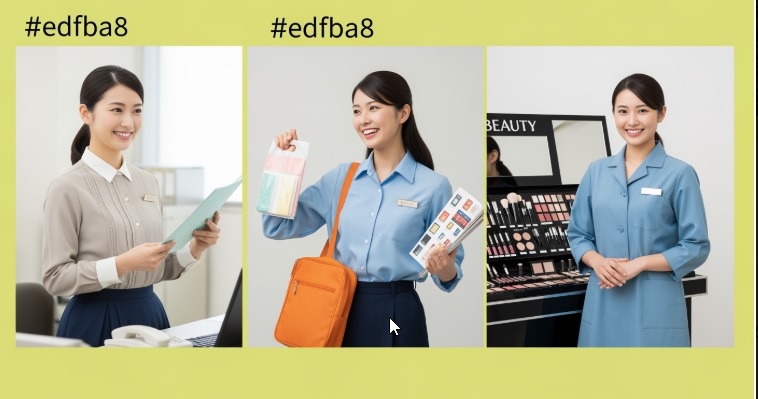
画像生成で「職業別の3人画像」を作成する場合は、
実はAI側は内部で個別画像×3回生成してる(合成ではなく3回生成処理)となる。
✅ Genspark画像生成のサイズ仕様(現時点)
| 項目 | 内容 |
|---|---|
| 解像度指定 | px単位は指定不可 |
| 比率指定 | 1:1、16:9、4:3、3:4などのプリセットアスペクト比で選択 |
| 出力解像度 | 内部で自動調整(例:1024×1024、1792×1024など) |
| カスタム解像度 | 不可(少なくともユーザー側UIでは指定不能) |
| 後処理 | 生成後に外部ツールでトリミング・リサイズが実務的対応策 |
✅ なぜ比率だけなのか?
これは以下の理由が背景にあります:
- AIモデルの負荷最適化(サイズ自由化はVRAM負荷が高い)
- 品質管理(アスペクト比ごとにモデルが調整済み)
- ユーザーの操作負担軽減(初心者でも破綻しにくい)
コメント